
OneWire: Latest News & Alerts
AppSpark GroupNews & Magazines
4.3207.00 Reviews
- Version
- 2.33.1
- Installs
- 100.00K
- Age Rating
- Everyone
Screenshots
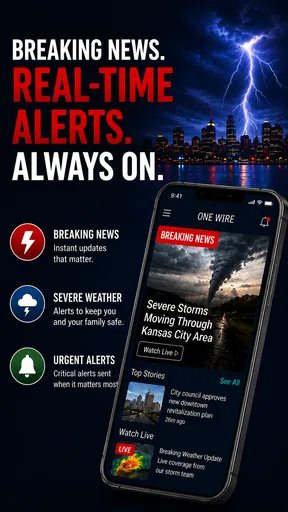
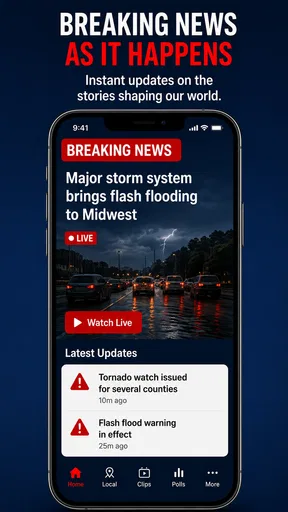
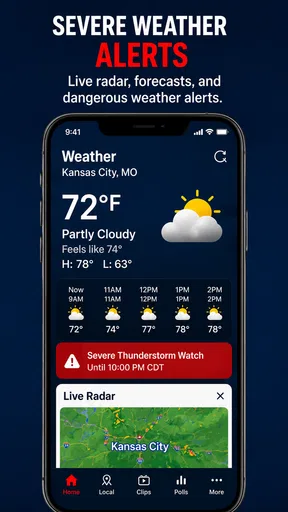
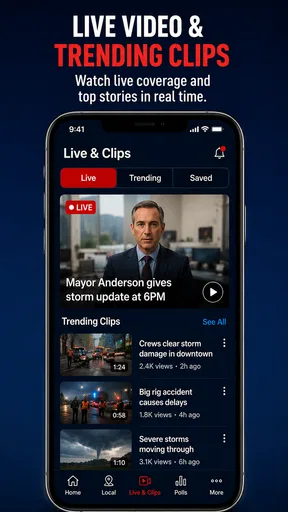
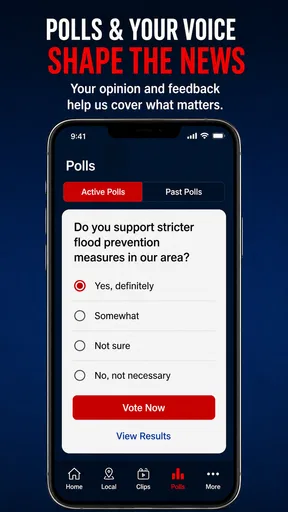
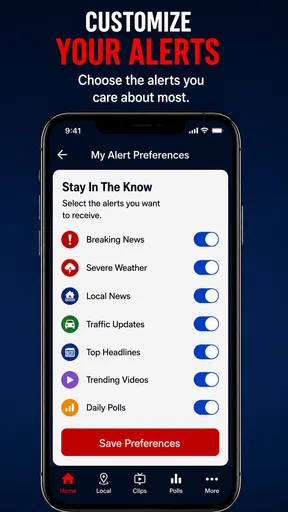

Our Review of OneWire: Latest News & Alerts
 Analysis by Appyee
News apps often feel useful on the first day and disposable by the third week. I approached OneWire: Latest News & Alerts with that problem in mind: does it become a dependable daily habit, or is it simply another place to glance at headlines? My experience is that its appeal comes from putting breaking news, nearby updates, and severe-weather information into one focused destination rather than making me jump between several apps.
That focus matters most when I want awareness without committing to a long reading session. OneWire is a free news and magazines app from AppSpark Group, aimed at people who want timely information at their fingertips. It is rated for Everyone, works on Android 8.0 and later, and its current version is 2.32.2. The app has already passed the early-adopter stage, with more than one hundred thousand installs and a 4.5 average from roughly eight hundred ratings.
I would not describe it as a complete replacement for every news source. Instead, I see it as a practical front door: a place to check what is happening, identify what deserves attention, and then decide whether a deeper source is needed. That distinction becomes increasingly important after the novelty wears off.
What feels useful during the first week
During the first few days, the strongest impression is convenience. A single news app that combines urgent headlines, local developments, and serious weather information can reduce the small amount of friction involved in staying informed. I do not have to remember which separate app handles general news, local events, or weather alerts. That makes OneWire particularly easy to reach for during a commute, before leaving home, or when a sudden change in conditions makes me want a quick update.
The local angle is more valuable than it may sound. National headlines are easy to find, but they do not always answer the practical question I have at a specific moment: what could affect my route, neighborhood, or plans today? Local updates can be less polished than major national coverage, yet they often have more immediate relevance. I found the app most convincing when I treated it as a way to establish local context rather than as a replacement for long-form journalism.
Severe-weather information gives the app another clear use case. On an ordinary day, I may not open a weather-focused app repeatedly. When conditions become uncertain, however, a news-and-alerts destination feels more natural because the weather story sits alongside other developing events. That combination can help me understand not only what the conditions are, but why they matter in the wider local picture.
A useful first-week routine is to check OneWire at two different times instead of leaving it open constantly. A quick morning visit can show whether anything affects the day ahead, while an evening check can catch developments that occurred after work or school. This approach keeps the app from turning into an endless stream of interruptions and makes its information easier to process.
The app is at its best when I use it as an awareness tool, not as a substitute for careful reading. A headline can tell me that something is happening, but important decisions still deserve fuller reporting and confirmation from a trusted source. OneWire helps with discovery and immediacy; it should not encourage me to form a strong opinion from a glance alone.
Who gets the fastest benefit
People who want a compact local-news habit are the clearest audience. It also suits anyone who prefers a general news app with weather relevance instead of maintaining several separate destinations. If your day involves changing travel plans, outdoor work, family logistics, or simply a need to know what is happening nearby, the combination is more useful than a generic headline feed.
I can also see value for readers who do not want to spend a long time browsing. OneWire supports a short check-in style: open it, scan what appears important, and leave. That makes it less demanding than a newspaper-style app built around extended reading. The trade-off is that readers who enjoy detailed analysis, opinion columns, or carefully organized sections may find the experience too immediate and not deep enough on its own.
The free entry point helps with experimentation. I could try it without making a financial commitment, which is exactly what I want from a habit-forming utility. There are in-app purchases ranging from ninety-nine cents to nine dollars and ninety-nine cents per item, so anyone considering optional paid elements should review what is offered before spending. The free starting point is attractive, but it is still worth keeping an eye on purchase prompts if I am trying to maintain a simple, no-cost news routine.
Does it keep earning attention after the first month?
The more difficult test is recurring value. A news app cannot rely on the excitement of installation forever; it has to remain useful on quiet days as well as during major events. OneWire has a reasonable foundation for that because its subject matter changes continuously. Breaking stories, local developments, and severe weather are not static content categories. Their value depends on what is happening around me, which gives the app a natural reason to remain installed.
Still, changing content does not automatically create a good habit. I found that the app works better when I give it a specific role. For me, that role is a short check for awareness, followed by a deliberate decision about what deserves more time. If I open it whenever I feel bored, the experience can become indistinguishable from casual scrolling. If I open it before a commute or when weather may affect plans, the information feels more purposeful.
A realistic everyday scenario shows where it fits. Imagine I am preparing to leave for work and see that the weather may become disruptive. I can use OneWire to look for the immediate local picture, scan for related updates, and decide whether I need extra travel time or a different plan. Later, if a major headline catches my attention, I can seek a fuller account elsewhere. The app saves me from starting with a blank information landscape, but it does not pretend that a short scan is the whole research process.
Another useful workflow is to separate urgent checking from background reading. I can open the app briefly when I need current awareness, then return later to read more thoughtfully through another source. This prevents the common mistake of expecting one mobile feed to perform every news function equally well. OneWire earns its place by being the first stop, not necessarily the last.
Its month-to-month value will therefore vary by location and personal routine. Someone living in an area with frequent local developments or changing weather may find the app consistently relevant. Someone who already has excellent local coverage, a dedicated weather service, and a preferred national news reader may see less additional value. The app is most compelling when it reduces overlap rather than adding another identical headline feed.
Small habits that make it more useful
I recommend deciding in advance what counts as a meaningful check. For example, I might look for one local development, one major wider story, and any weather issue that could affect my plans. This simple limit keeps the session focused and makes it easier to notice whether the app is genuinely helping. Without a boundary, even a well-designed news feed can consume attention without improving understanding.
I would also avoid treating every alert or urgent-looking item as equally important. News language naturally emphasizes immediacy, while my own needs may be more practical: road conditions, local disruptions, public safety information, or changes that affect people close to me. Reading with that filter makes the app more useful and reduces the emotional fatigue that comes from reacting to every headline.
A third tip is to use the app as a prompt for follow-up, not as proof that I already know enough. If a story affects finances, travel, health, safety, or a major decision, I would look for the fuller context before acting. That habit preserves the speed advantage of OneWire without confusing speed with completeness.
Maintenance, fatigue, and the cost of staying informed
The maintenance burden is fairly low in the sense that a news app does not require a complicated setup routine. The real work is mental: deciding when to check, what to ignore, and when to stop. That is easy to underestimate. A feed built around breaking information can become a background obligation if I feel that I must keep checking it to avoid missing something.
OneWire’s combination of general news and severe-weather updates can make it especially relevant during active periods, but that same immediacy can become tiring. Repeatedly seeing urgent headlines may create the impression that everything requires an instant response. I found it healthier to make the app part of a schedule rather than allowing it to dictate my attention throughout the day.
There is also a trade-off between breadth and depth. A combined news destination is efficient because it brings several information needs together. The downside is that a broad feed may not provide the specialized organization of a dedicated weather app or the detailed editorial experience of a newspaper subscription. If I need minute-by-minute weather tools, deep investigative reporting, or a carefully curated magazine library, a more specialized alternative may serve me better.
Readers should also consider whether they already have overlapping apps. If I maintain separate services for national news, local news, weather, and emergency information, adding OneWire may create duplication instead of simplicity. Its advantage appears when consolidation is useful. Its weakness appears when I already have a trusted system and do not want another stream competing for attention.
The purchase model deserves a practical mention as well. The app is free to install, but optional items can cost from ninety-nine cents to nine dollars and ninety-nine cents. I would treat those purchases as something to evaluate rather than assume they are necessary for ordinary use. Anyone sharing a device with children should remember that the Everyone rating describes the content age category, not a guarantee that every purchase decision will be made carefully.
Compatibility is straightforward for users with Android 8.0 or newer. That covers a wide range of devices, but owners of older phones should check their operating system before planning around the app. The stated release date was December 11, 2023, and the continuing version number indicates that the product is being maintained as an active app rather than left as a one-time experiment.
When I would skip it
I would skip OneWire if my main goal were long-form journalism, academic research, or a single publication’s deeply edited coverage. I would also hesitate if I strongly dislike alert-oriented news experiences or already have a local information workflow that I trust. In those situations, another app may be more focused and less repetitive.
I would not choose it as my only source for high-stakes decisions. The convenience of a quick feed is valuable, but important stories can develop, change, or require context that a short update cannot provide. For serious topics, I would use OneWire to notice the issue and then consult fuller reporting or official information.
My long-term verdict
After the initial novelty fades, OneWire: Latest News & Alerts earns lasting space most convincingly as a compact first check for local news, developing stories, and severe-weather awareness. It is not trying to be my entire media diet, and I think that is the right way to judge it. Its practical strength is reducing the distance between opening an app and understanding what may matter nearby.
The app is a good fit for someone who wants a free, accessible news habit and values convenience over deep specialization. Its Everyone rating makes it broadly approachable, while the Android 8.0 minimum keeps it available to users who are not running the newest devices. AppSpark Group has built something that can become a useful daily checkpoint, provided I give it a clear purpose.
My reservation is not about the basic idea; it is about attention. Any breaking-news product can become noisy, repetitive, or emotionally draining if I let it occupy every spare moment. OneWire works best with boundaries: check it at sensible times, separate headlines from verified understanding, and follow important stories beyond the first glance. That maintenance is small, but it is essential.
For me, the final answer is a qualified recommendation. Install it if you want one convenient place to begin the day’s awareness routine, especially when local conditions and weather matter. Keep a more specialized source for detailed reporting or precise weather needs. If you use OneWire as a focused starting point rather than an all-purpose replacement, it has a realistic chance of remaining useful long after the first week.
Privacy and Permissions
See what permissions an app requests and how it handles your data.
- Location
- approximate location (network-based), precise location (GPS and network-based)
- Wi-Fi connection information
- view Wi-Fi connections
- Other
- view network connections, full network access, run at startup, draw over other apps, control vibration, prevent device from sleeping, Google Play license check
Verdict
Strengths of OneWire: Latest News & Alerts
- Fast access to breaking news and important alerts
- Clean interface makes headlines easy to scan
- Useful notifications help users stay informed
- Covers multiple topics in one convenient app
- Simple navigation suits both casual and frequent readers
Limitations of OneWire: Latest News & Alerts
- Frequent alerts may feel excessive without notification controls
- Some stories may offer limited detail beyond the headline
- Content quality can vary between news categories
- Requires an internet connection for current updates
- Personalization options may be limited for advanced users
Similar Picks in This Category
View All
Google News - Daily Headlines
Google LLC4.0

X
X Corp.4.8

Flipboard:Your Social Magazine
Flipboard3.4

Opera News: breaking & local
Opera4.5

Hindi News by Dainik Bhaskar
Dainik Bhaskar Group4.0

Way2News Daily News App
Way2News ( Formerly Way2SMS )4.6
Frequently Asked Questions
What is OneWire: Latest News & Alerts?
OneWire: Latest News & Alerts is a news and notification app designed to help users keep up with important headlines, updates, and alerts in one place. It can be useful for people who prefer quick access to current information rather than browsing several websites or social media feeds. Available content, categories, and alert topics may vary depending on the app version and region.
How does OneWire deliver news and alerts?
The app generally relies on push notifications and an in-app news feed to present breaking stories, updates, and selected alerts. After installation, users may be asked to allow notifications and choose topics or preferences. If notifications are disabled, the app can still be opened manually, but time-sensitive updates may not appear immediately. Notification frequency may also depend on selected settings.
Can I customize the topics and notifications in OneWire?
OneWire may provide options for managing the types of news and alerts you receive, helping reduce unwanted notifications. Before relying on it for specific information, check the settings for topic selection, alert priority, sound, and notification frequency. Some versions may offer more customization than others, and certain controls can depend on your device’s Android or iOS notification permissions.
Is OneWire: Latest News & Alerts free to download and use?
The application may be available as a free download, but users should review its store listing carefully for advertisements, optional purchases, subscriptions, or premium features. App pricing and included functions can change over time. It is also worth checking the in-app terms before activating any trial, especially if access to advanced alerts or additional content requires recurring payment.
What should I consider before downloading OneWire?
Before downloading OneWire, review the developer information, privacy policy, requested permissions, supported device version, and recent user feedback. A news app may request notification access and internet connectivity, while some features may collect usage or device information. Also remember that alerts are not a substitute for official emergency services or verified primary sources when accuracy and immediate action are important.
